


My wife was looking for a way to add subtitles to a video she wanted to post. Every tool she found either required uploading to some server, was paid with watermarks, or exported at lower quality. I figured — how hard can this be to build from scratch?
Turns out, not that hard. A few hours later, autosub was working.
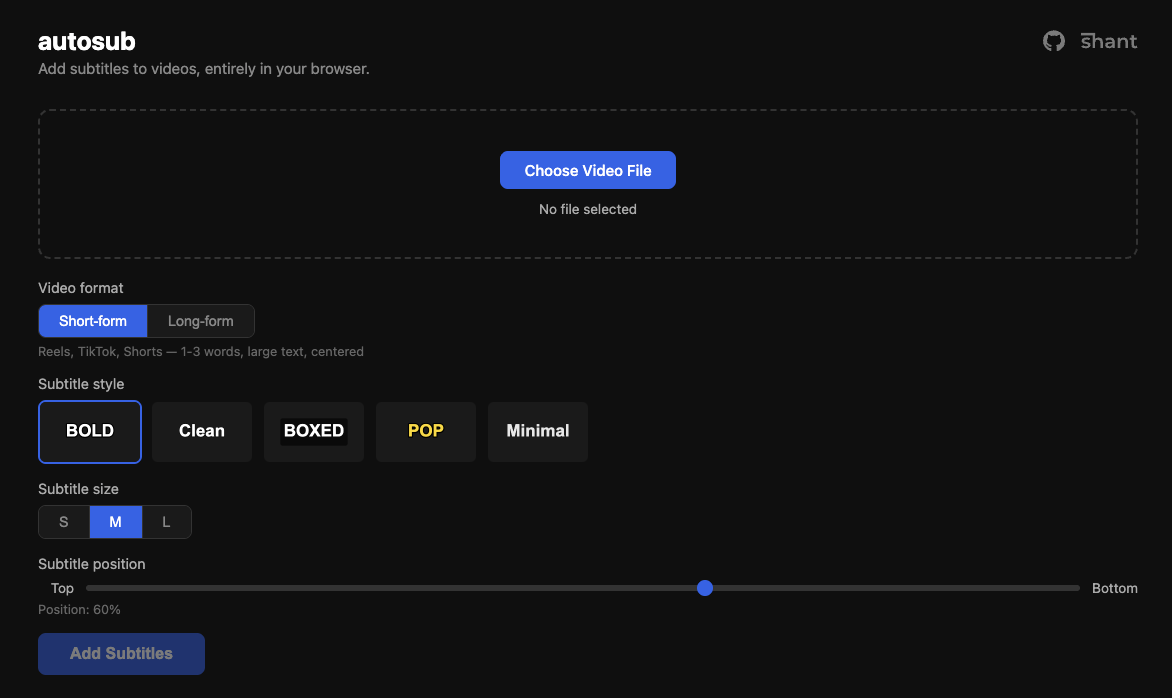
What it does
Upload a video, it transcribes the speech, lets you pick a subtitle style, and burns the subtitles into the video. After transcription, you get an editable list of all the cues — so you can fix any words Whisper got wrong before burning. Everything runs in the browser. Your video never leaves your device.

How it works under the hood
The pipeline has three main phases:
Transcription — Whisper (the small multilingual model) runs via Transformers.js inside a Web Worker. This was necessary because ONNX inference blocks the main thread so hard that even CSS animations freeze. Running it in a worker keeps the UI responsive. Whisper also handles translation — non-English audio gets translated to English subtitles automatically.
Subtitle rendering — Canvas 2D draws the text onto each video frame. This sounds simple until you deal with word-wrapping, per-line background boxes with rounded corners, and the fun edge case of multi-line boxed subtitles where the lines are different widths. Ended up building a custom composite path with concave notch curves at the width-step junctions to make the background look like a single cohesive shape.
Video encoding — The WebCodecs API decodes frames, we draw subtitles on a canvas, then re-encode with hardware acceleration. On a MacBook this uses VideoToolbox and processes 4K video at ~47 fps. There’s an FFmpeg.wasm fallback for browsers that don’t support WebCodecs, but it’s significantly slower since it runs entirely in WASM on the CPU.
Interesting problems along the way
Memory was the first real issue. Whisper’s model is ~250MB in memory, the decoded audio is another chunk, and 4K video frames are ~32MB each uncompressed. Without backpressure on the WebCodecs decode/encode pipeline, memory usage would spike to several GB. The fix was a pump mechanism that checks queue sizes before feeding more frames, and disposing the Whisper model before starting the burn phase.
HEVC 10-bit input caused video corruption on the first attempt — black squiggly lines on certain frames. The input video was HDR (yuv420p10le, bt2020) and H.264 encoding didn’t handle the pixel format conversion gracefully. A format=yuv420p conversion step before the drawtext filter fixed it.
The initial FFmpeg.wasm approach took 30+ minutes for a 44-second 4K video. Switching to WebCodecs brought it down to ~24 seconds. The difference is hardware encoding vs single-threaded WASM — roughly 50x.
Tech choices
- Transformers.js over a backend API — no server costs, no API keys, works offline after first model download (~250MB, cached)
- WebCodecs over FFmpeg.wasm for encoding — hardware acceleration makes 4K feasible
- Canvas 2D for subtitle rendering — simple, reliable, same code for preview and final output
- Web Worker for transcription — keeps UI alive during heavy ONNX inference
- mp4box.js for demuxing, mp4-muxer for output — lightweight, browser-native
The whole thing is vanilla HTML/CSS/JS bundled with Vite. No React, no framework. It didn’t need one.
Try it
notshant.xyz/autosub — works best in Chrome. Source on GitHub.